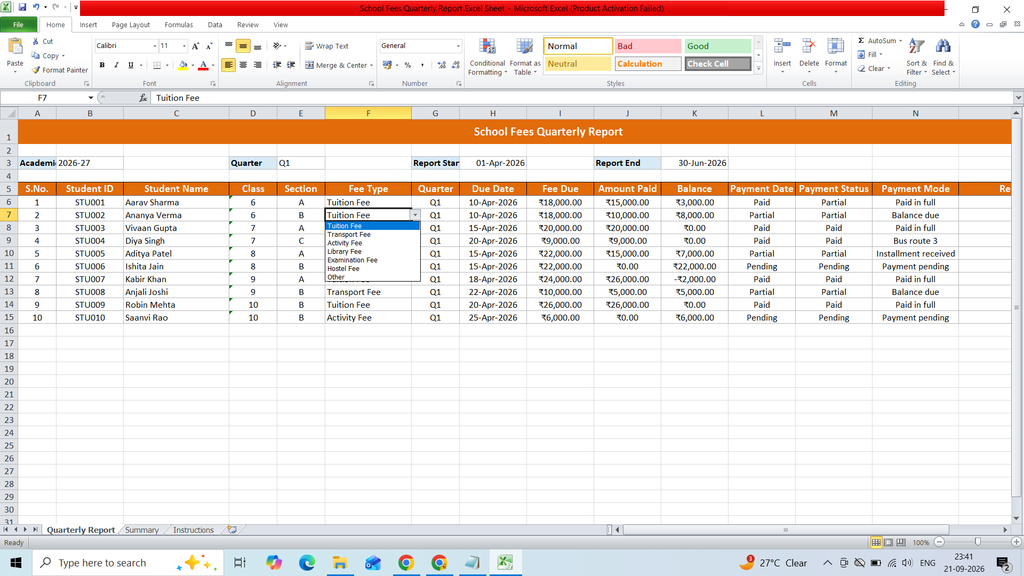
Download a free School Fees Quarterly Report Excel Sheet to efficiently track and manage student fee collections on a quarterly basis. This ready-to-use Excel template helps schools and educational institutions organize student details, fee payments, pending amounts, payment dates, and quarterly fee records in a simple and structured format.
Key Features:
- S.No.
- Student ID
- Student Name
- Class
- Section
- Fee Type
- Quarter
- Due Date
- Fee Due
- Amount Paid
- Balance
- Payment Date
- Payment Status
- Payment Mode
- Remarks
- Dashboard
- KPI Card
- Pie Chart
Formulas :
Balance
=I6-J6
Payment Status
=IF(J6=0,”Pending”,IF(J6>=I6,”Paid”,”Partial”))
Total Fee Due =SUM(‘Quarterly Report’!I6:I1000)
Total Amount Paid =SUM(‘Quarterly Report’!J6:J1000)
Total Balance =SUM(‘Quarterly Report’!K6:K1000)
Collection Rate =IF(B3=0,0,B4/B3)
Total Students =COUNTA(‘Quarterly Report’!B6:B1000)
Paid Students =COUNTIF(‘Quarterly Report’!M6:M1000,”Paid”)
Partial Students =COUNTIF(‘Quarterly Report’!M6:M1000,”Partial”)
Pending Students =COUNTIF(‘Quarterly Report’!M6:M1000,”Pending”)
Paid =COUNTIF(‘Quarterly Report’!M6:M1000,”Paid”)
Partial =COUNTIF(‘Quarterly Report’!M6:M1000,”Partial”)
Pending =COUNTIF(‘Quarterly Report’!M6:M1000,”Pending”)