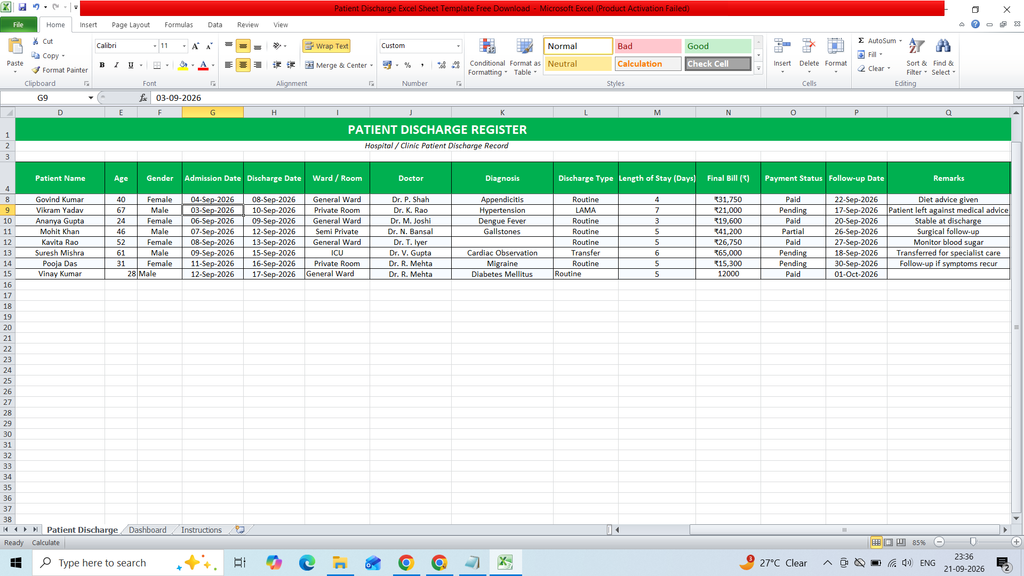
Download a free Patient Discharge Excel Sheet Template to easily record and manage patient discharge details. This ready-to-use Excel template helps hospitals, clinics, and healthcare staff organize patient information, admission and discharge dates, diagnosis, treatment details, doctor information, and other important discharge records in a structured format.
Key Features :
- S.No.
- Discharge ID
- Patient ID
- Patient Name
- Age
- Gender
- Admission Date
- Discharge Date
- Ward / Room
- Doctor
- Diagnosis
- Discharge Type
- Length of Stay (Days)
- Final Bill (₹)
- Payment Status
- Follow-up Date
- Remarks
- Dashboard
- Pie Chart
- Bar Chart
- KPI Card
Formulas :
Length of Stay (Days) =IF(OR(G5=””,H5=””),””,H5-G5)
Total Discharges =COUNTA(‘Patient Discharge’!B5:B1000)
Average Length of Stay =IFERROR(AVERAGE(‘Patient Discharge’!M5:M1000),0)
Total Final Billing =SUM(‘Patient Discharge’!N5:N1000)
Paid Bills =COUNTIF(‘Patient Discharge’!O5:O1000,”Paid”)
Pending Bills =COUNTIF(‘Patient Discharge’!O5:O1000,”Pending”)
Partial Bills =COUNTIF(‘Patient Discharge’!O5:O1000,”Partial”)
Routine =COUNTIF(‘Patient Discharge’!L5:L1000,D4)
LAMA =COUNTIF(‘Patient Discharge’!L5:L1000,D5)
Transfer =COUNTIF(‘Patient Discharge’!L5:L1000,D6)
Death =COUNTIF(‘Patient Discharge’!L5:L1000,D7)
Absconded =COUNTIF(‘Patient Discharge’!L5:L1000,D8)
Paid =COUNTIF(‘Patient Discharge’!O5:O1000,D12)
Partial =COUNTIF(‘Patient Discharge’!O5:O1000,D13)
Pending =COUNTIF(‘Patient Discharge’!O5:O1000,D14)
Waived =COUNTIF(‘Patient Discharge’!O5:O1000,D15)