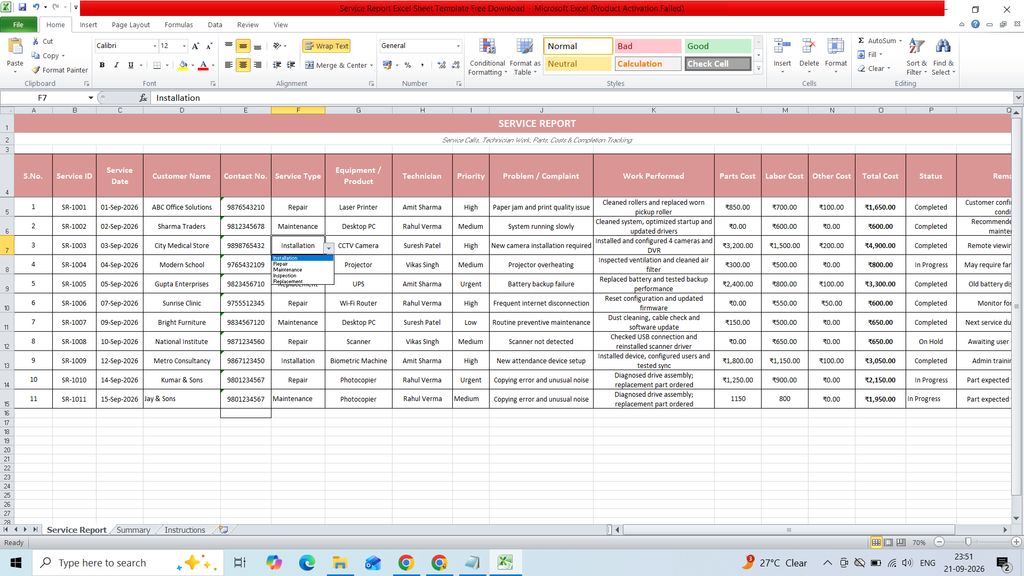
Download a free Service Report Excel Sheet Template to easily record, organize, and manage service-related activities. This ready-to-use Excel template helps businesses and service teams track customer details, service dates, work performed, issues reported, service status, technician information, and other important service records in a structured format.
Key Features:
- S.No.
- Service ID
- Service Date
- Customer Name
- Contact No.
- Service Type
- Equipment / Product
- Technician
- Priority
- Problem / Complaint
- Work Performed
- Parts Cost
- Labor Cost
- Other Cost
- Total Cost
- Status
- Remarks
- Dashborad
- Bar Chart
- KPI Card
- Pie Chart
Formulas :
Total Cost
=SUM(L5:N5)
Total Service Reports =COUNTA(‘Service Report’!B5:B1000)
Completed Services =COUNTIF(‘Service Report’!P5:P1000,”Completed”)
In Progress =COUNTIF(‘Service Report’!P5:P1000,”In Progress”)
Open Services =COUNTIF(‘Service Report’!P5:P1000,”Open”)
On Hold =COUNTIF(‘Service Report’!P5:P1000,”On Hold”)
Cancelled =COUNTIF(‘Service Report’!P5:P1000,”Cancelled”)
Total Service Cost =SUM(‘Service Report’!O5:O1000)
Average Service Cost =IFERROR(AVERAGE(‘Service Report’!O5:O1000),0)
Open =COUNTIF(‘Service Report’!P5:P1000,D4)
In Progress =COUNTIF(‘Service Report’!P5:P1000,D5)
Completed =COUNTIF(‘Service Report’!P5:P1000,D6)
On Hold =COUNTIF(‘Service Report’!P5:P1000,D7)
Cancelled =COUNTIF(‘Service Report’!P5:P1000,D8)
Installation =COUNTIF(‘Service Report’!F5:F1000,D18)
Repair =COUNTIF(‘Service Report’!F5:F1000,D19)
Maintenance =COUNTIF(‘Service Report’!F5:F1000,D20)
Inspection =COUNTIF(‘Service Report’!F5:F1000,D21)
Replacement =COUNTIF(‘Service Report’!F5:F1000,D22)