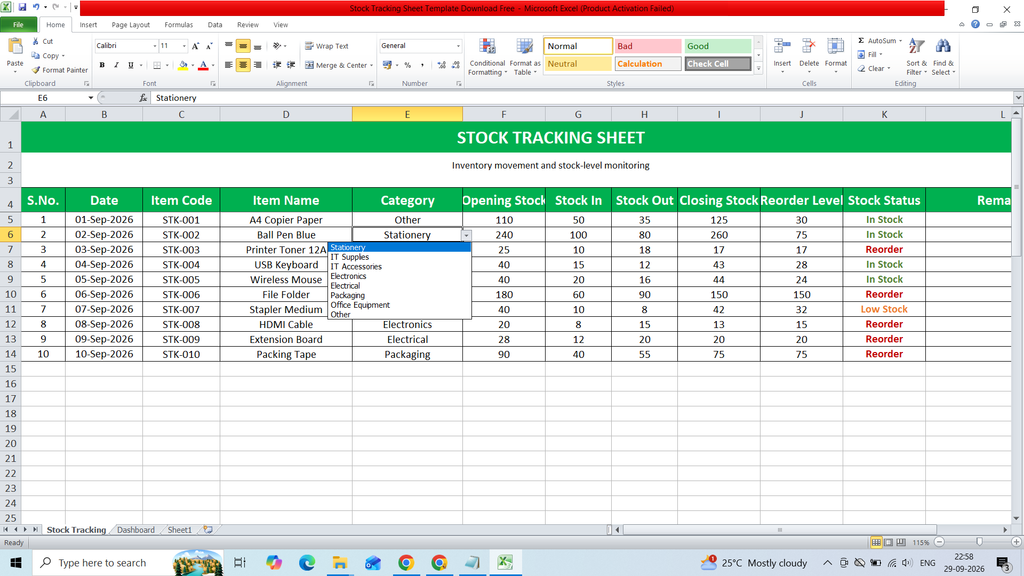
Download a free Stock Tracking Sheet Template to easily record, organize, and monitor inventory levels. This ready-to-use Excel template helps you track product names, item codes, stock quantities, purchase and sales details, stock-in and stock-out records, current inventory, and other important stock information in a simple and structured format.
It is useful for businesses, shops, warehouses, and individuals who want to maintain accurate inventory records and monitor stock levels efficiently.
Key Featurs :
- S.No.
- Date
- Item Code
- Item Name
- Category
- Opening Stock
- Stock In
- Stock Out
- Closing Stock
- Reorder Level
- Stock Status
- Remarks
- Dashboard
- KPI Card
- Bar Chart
- Table Summery
Formulas :
S.No.
=IF(B5=””,””,ROW()-4)
Item Code
STK-001
Closing Stock
=F5+G5-H5
Stock Status
=IF(I5<=J5,”Reorder”,IF(I5<=J5*1.5,”Low Stock”,”In Stock”))
Total Stock In =SUM(‘Stock Tracking’!G5:G54)
Total Stock Out =SUM(‘Stock Tracking’!H5:H54)
Current Stock =SUM(‘Stock Tracking’!I5:I54)
Reorder Items =COUNTIF(‘Stock Tracking’!K5:K54,”Reorder”)
Low Stock Items =COUNTIF(‘Stock Tracking’!K5:K54,”Low Stock”)
Stock Status Count
In Stock =COUNTIF(‘Stock Tracking’!K5:K54,D4)
Low Stock =COUNTIF(‘Stock Tracking’!K5:K54,D5)
Reorder =COUNTIF(‘Stock Tracking’!K5:K54,D6)
Current Stock
=SUMIF(‘Stock Tracking’!E5:E54,A11,’Stock Tracking’!I5:I54)