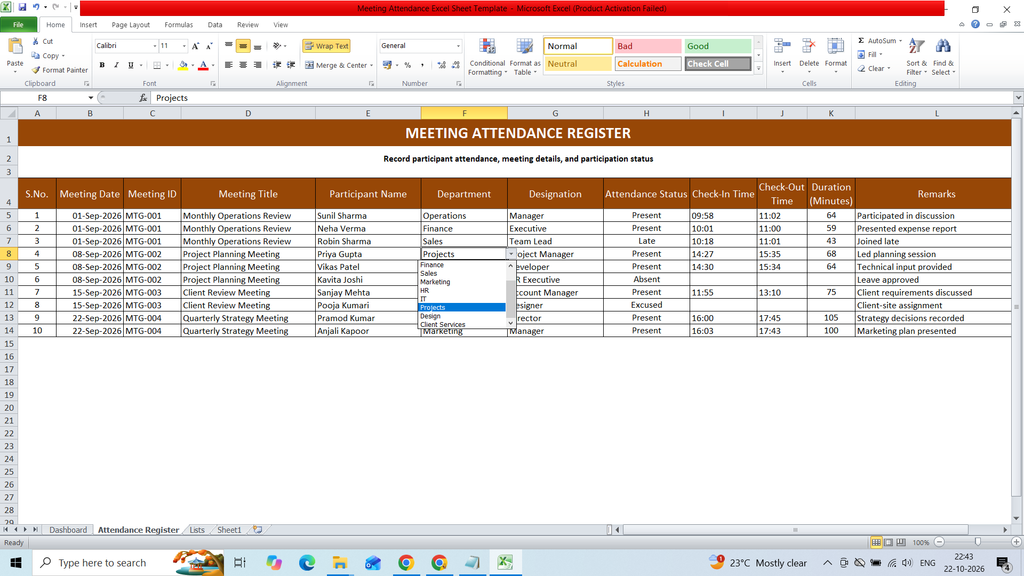
Download a free Meeting Attendance Excel Sheet Template to easily record and manage attendance for meetings, conferences, and office sessions. This ready-to-use Excel template helps you track participant names, employee IDs, departments, meeting dates, attendance status, arrival times, and remarks in a simple and organized format. It is useful for businesses, offices, schools, and organizations to maintain accurate attendance records, monitor participant presence, and simplify meeting documentation.
Key Features :
- S.No.
- Meeting Date
- Meeting ID
- Meeting Title
- Participant Name
- Department
- Designation
- Attendance Status
- Check-In Time
- Check-Out Time
- Duration (Minutes)
- Remarks
Formulas:
S.No.
=ROW()-4
Duration (Minutes)
=IF(OR(I5=””,J5=””),””,ROUND(MOD(J5-I5,1)*1440,0))
Total Records
=COUNTA(‘Attendance Register’!$E$5:$E$1000)
Present
=COUNTIF(‘Attendance Register’!$H$5:$H$1000,”Present”)
Absent
=COUNTIF(‘Attendance Register’!$H$5:$H$1000,”Absent”)
Late
=COUNTIF(‘Attendance Register’!$H$5:$H$1000,”Late”)
Attendance Rate
=IFERROR((COUNTIF(‘Attendance Register’!$H$5:$H$1000,”Present”)+COUNTIF(‘Attendance Register’!$H$5:$H$1000,”Late”))/COUNTA(‘Attendance Register’!$E$5:$E$1000),0)
Average Duration (min)
=IFERROR(AVERAGE(‘Attendance Register’!$K$5:$K$1000),0)
Excused
=COUNTIF(‘Attendance Register’!$H$5:$H$1000,”Excused”)
Count
=COUNTIF(‘Attendance Register’!$H$5:$H$1000,A13)
File Size: 20KB
Total Sheet: