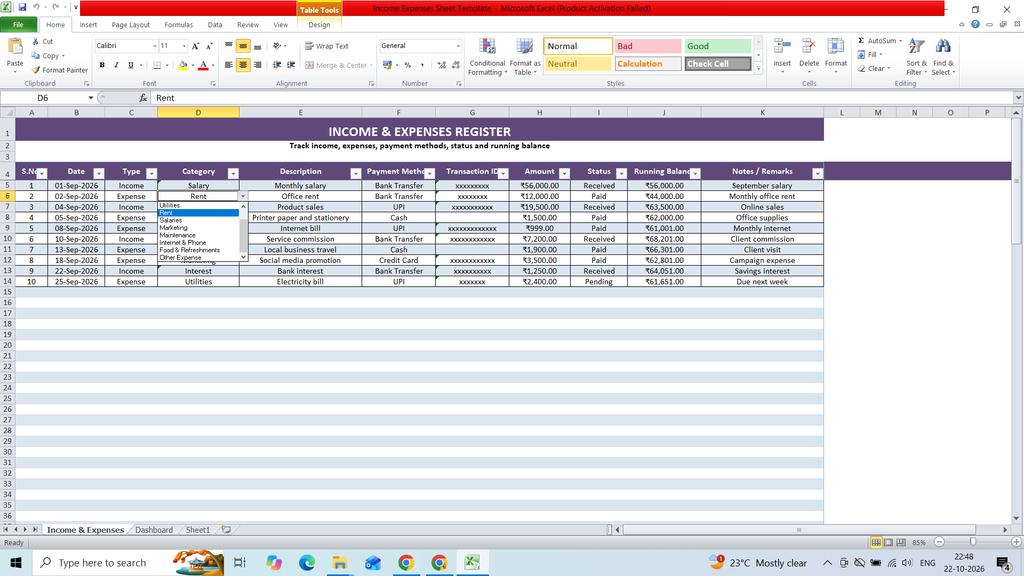
Download a free Income and Expenses Sheet Template to easily record, organize, and manage your income and expenses. This ready-to-use Excel template helps you track income sources, expense categories, transaction dates, descriptions, payment methods, total income, total expenses, and remaining balance in a simple and structured format. It is useful for individuals, families, freelancers, and small businesses to monitor cash flow, manage budgets, control spending, and maintain accurate financial records.
Key Features:
- S.No.
- Date
- Type
- Category
- Description
- Payment Method
- Transaction ID
- Amount
- Status
- Running Balance
- Notes / Remarks
Formulas:
S.No.
=ROW()-4
Running Balance
=IF(C5=”Income”,H5,-H5)
Total Income =SUMIF(‘Income & Expenses’!$C$5:$C$104,”Income”,’Income & Expenses’!$H$5:$H$104)
Total Expenses =SUMIF(‘Income & Expenses’!$C$5:$C$104,”Expense”,’Income & Expenses’!$H$5:$H$104)
Net Balance =B3-E3
Total Income =B3
Total Expenses =E3
Net Balance =H3
Pending Transactions =COUNTIF(‘Income & Expenses’!$I$5:$I$104,”Pending”)
Income
=SUMIFS(‘Income & Expenses’!$H$5:$H$104,’Income & Expenses’!$C$5:$C$104,”Income”,’Income & Expenses’!$B$5:$B$104,”>=”&A16,’Income & Expenses’!$B$5:$B$104,”<“&EDATE(A16,1))
Expenses
=SUMIFS(‘Income & Expenses’!$H$5:$H$104,’Income & Expenses’!$C$5:$C$104,”Expense”,’Income & Expenses’!$B$5:$B$104,”>=”&A16,’Income & Expenses’!$B$5:$B$104,”<“&EDATE(A16,1))
Net
=B16-C16
File Size : 24KB
Total Sheet: 3