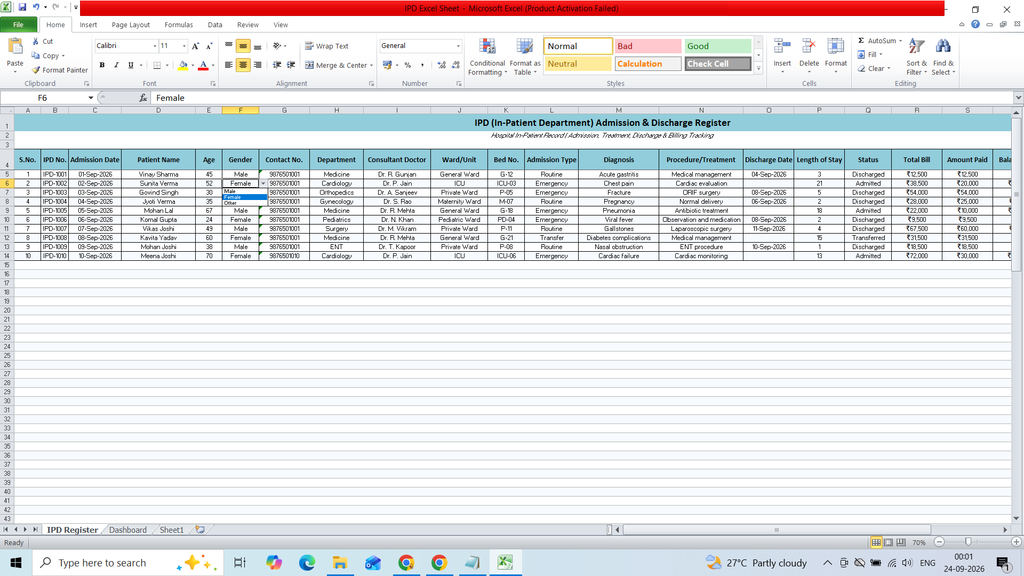
Download a free IPD Excel Sheet Template to easily record and manage In-Patient Department (IPD) details. This ready-to-use Excel template helps hospitals and healthcare facilities organize patient information, admission and discharge dates, patient IDs, room or ward details, doctor information, treatment records, and other important IPD data in a simple and structured format.
Key Features :
- Ward/Unit
- Bed No.
- Admission Type
- Diagnosis
- Procedure/Treatment
- Discharge Date
- Length of Stay
- Status
- Total Bill
- Amount Paid
- Balance Due
- Payment Status
- Remarks
- Dashbaord
- Table Summery
- Bar Chart
- KPI Card
Formula :
S.No.
=ROW()-4
Length of Stay
=IF(C5=””,””,IF(O5<>””,O5-C5,TODAY()-C5))
Balance Due
=IF(R5=””,””,MAX(R5-S5,0))
Billing
=SUMIF(‘IPD Register’!H5:H104,A11,’IPD Register’!R5:R104)
Patient Count
=COUNTIF(‘IPD Register’!H5:H104,A11)
Total Patients Currently Admitted Discharged Transferred
=COUNT(‘IPD Register’!D5:D104) =COUNTIF(‘IPD Register’!Q5:Q104,”Admitted”) =COUNTIF(‘IPD Register’!Q5:Q104,”Discharged”) =COUNTIF(‘IPD Register’!Q5:Q104,”Transferred”)
Total Billing Amount Collected Balance Due Avg. Length of Stay
=SUM(‘IPD Register’!R5:R104) =SUM(‘IPD Register’!S5:S104) =SUM(‘IPD Register’!T5:T104) =IFERROR(AVERAGE(‘IPD Register’!P5:P104),0)
Patient Count
=COUNTIF(‘IPD Register’!H5:H104,A11)
Billing
=SUMIF(‘IPD Register’!H5:H104,A11,’IPD Register’!R5:R104)