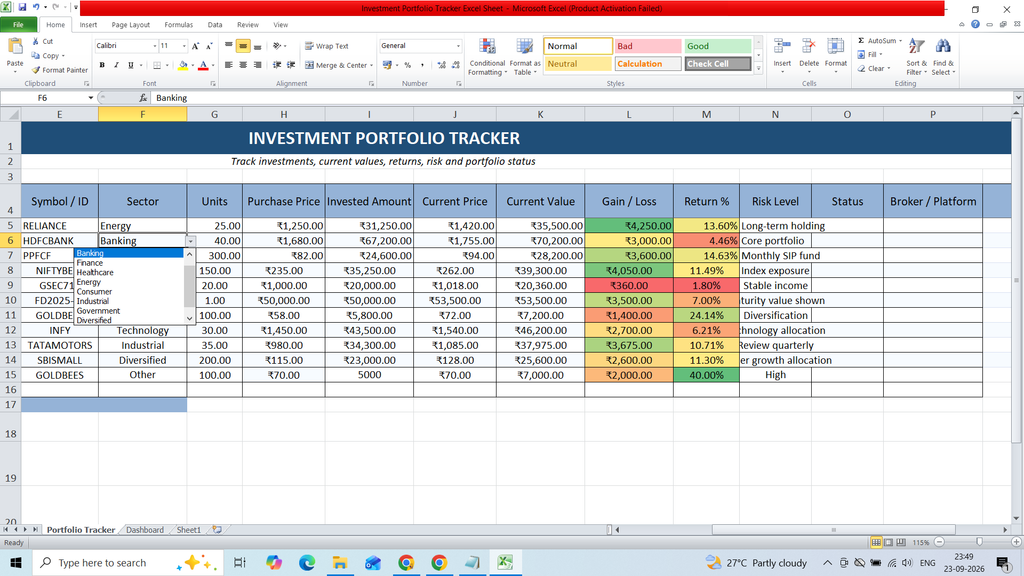
Download a free Investment Portfolio Tracker Excel Sheet Template to easily organize and monitor your investments. This ready-to-use Excel template helps you track investment details, asset names, purchase dates, quantities, purchase prices, current values, gains or losses, and overall portfolio performance in a simple and structured format.
Key Features :
- Symbol / ID
- Sector
- Units
- Purchase Price
- Invested Amount
- Current Price
- Current Value
- Gain / Loss
- Return %
- Risk Level
- Status
- Broker / Platform
- Notes / Remarks
- Dashboard
- Bar Chart
- Pie Chart
- KPI Card
Formulas :
Current Value
=G5*J5
Gain/Loss
=K5-I5
Return %
=IFERROR(L5/I5,0)
Total Invested =SUM(‘Investment Tracker’!I5:I14)
Current Value =SUM(‘Investment Tracker’!K5:K14)
Total Gain/Loss =SUM(‘Investment Tracker’!L5:L14)
Overall Return =IFERROR(B4/B2,0)
Invested Amount
=SUMIF(‘Investment Tracker’!$D$5:$D$1000,A8,’Investment Tracker’!$I$5:$I$1000)
Current Value
=SUMIF(‘Investment Tracker’!$D$5:$D$1000,A8,’Investment Tracker’!$K$5:$K$1000)
Gain/Loss
=C8-B8