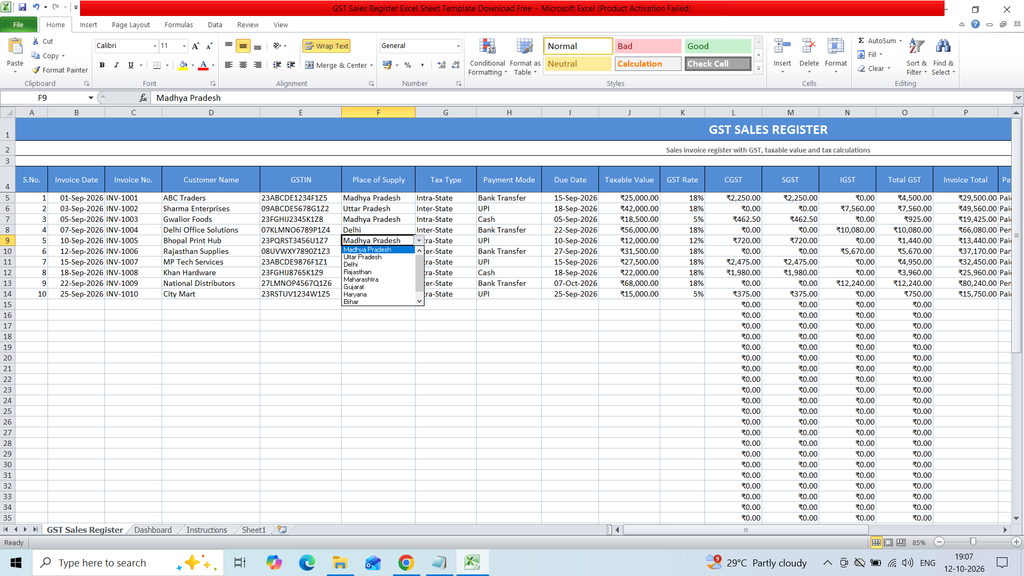
Download a free GST Sales Register Excel Sheet Template to easily record and manage sales transactions for GST accounting. This ready-to-use Excel template helps you organize customer details, invoice numbers, sales dates, GSTIN, taxable values, CGST, SGST, IGST, and total invoice amounts in a structured format. It is useful for business owners, accountants, shopkeepers, and GST-registered businesses to maintain accurate sales records, calculate GST amounts, track invoices, and simplify GST reporting.
Key Features:
S.No.
Invoice Date
Invoice No.
Customer Name
GSTIN
Place of Supply
Tax Type
Payment Mode
Due Date
Taxable Value
GST Rate
CGST
SGST
IGST
Total GST
Invoice Total
Payment Status
E-Invoice Status
E-Way Bill No.
Item/Service Description
HSN/SAC
Salesperson
Remarks
Formulas :
CGST
=IF(G5=”Intra-State”,J5K5/2,0)
SGST
=IF(G5=”Intra-State”,J5K5/2,0)
IGST
=IF(G5=”Inter-State”,J5*K5,0)
Total GST
=SUM(L5:N5)
Invoice Total
=J5+O5
Total Invoices =COUNTIF(‘GST Sales Register’!C5:C54,”<>”)
Taxable Sales =SUM(‘GST Sales Register’!J5:J54)
Total GST =SUM(‘GST Sales Register’!O5:O54)
Invoice Value =SUM(‘GST Sales Register’!P5:P54)
Paid Invoices =COUNTIF(‘GST Sales Register’!Q5:Q54,”Paid”)
Pending Invoices =COUNTIF(‘GST Sales Register’!Q5:Q54,”Pending”)
Intra-State =SUMIF(‘GST Sales Register’!G5:G54,”Intra-State”,’GST Sales Register’!P5:P54)
Inter-State =SUMIF(‘GST Sales Register’!G5:G54,”Inter-State”,’GST Sales Register’!P5:P54)
Paid =COUNTIF(‘GST Sales Register’!Q5:Q54,D9)
Pending =COUNTIF(‘GST Sales Register’!Q5:Q54,D10)
Partial =COUNTIF(‘GST Sales Register’!Q5:Q54,D11)
Overdue =COUNTIF(‘GST Sales Register’!Q5:Q54,D12)
Cancelled =COUNTIF(‘GST Sales Register’!Q5:Q54,D13)