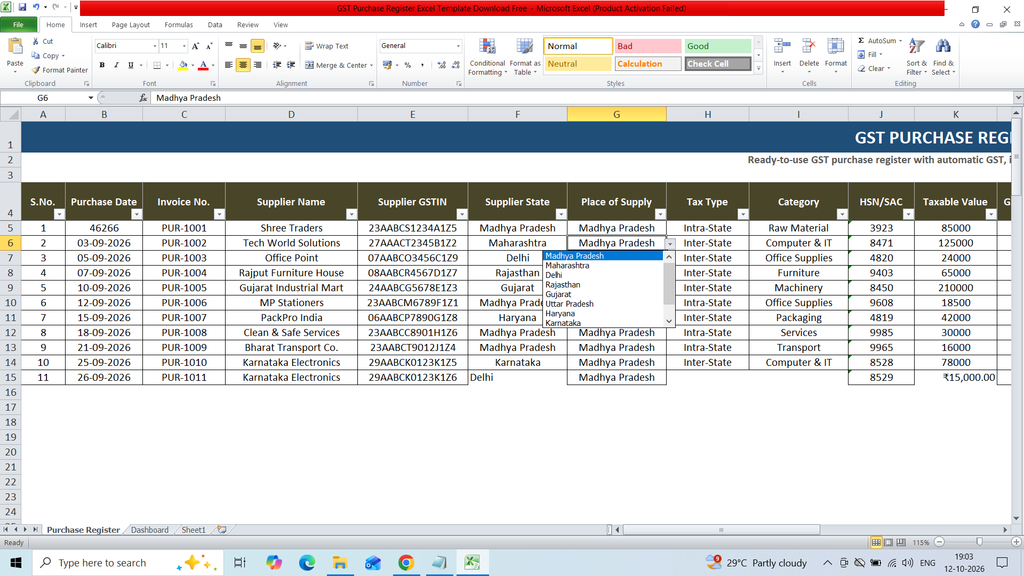
Download a free GST Purchase Register Excel Template to easily record and manage business purchase transactions. This ready-to-use Excel template helps you maintain supplier details, invoice numbers, purchase dates, GSTIN, taxable amounts, CGST, SGST, IGST, and total invoice values in an organized format. It is useful for businesses, shop owners, accountants, and GST-registered taxpayers who want to track purchases, calculate GST amounts, maintain accurate purchase records, and simplify GST reporting.
Key Features :
S.No.
Purchase Date
Invoice No.
Supplier Name
Supplier GSTIN
Supplier State
Place of Supply
Tax Type
Category
HSN/SAC
Taxable Value
GST Rate %
CGST Amount
SGST Amount
IGST Amount
Total GST
Invoice Total
ITC Eligible
Payment Status
Due Date
Remarks
Formulas:
CGST Amount
=IF(K5=””,””,IF(H5=”Intra-State”,K5*L5/2,0))
SGST Amount
=IF(K5=””,””,IF(H5=”Intra-State”,K5L5/2,0))
IGST Amount
=IF(K5=””,””,IF(H5=”Inter-State”,K5L5,0))
Total GST
=IF(K5=””,””,SUM(M5:O5))
Invoice Total
=IF(K5=””,””,K5+P5)
Total Purchases
=SUM(‘Purchase Register’!K5:K104)
Total GST
=SUM(‘Purchase Register’!P5:P104)
Invoice Value
=SUM(‘Purchase Register’!Q5:Q104)
ITC Eligible Purchases
=SUMIF(‘Purchase Register’!R5:R104,”Yes”,’Purchase Register’!K5:K104)