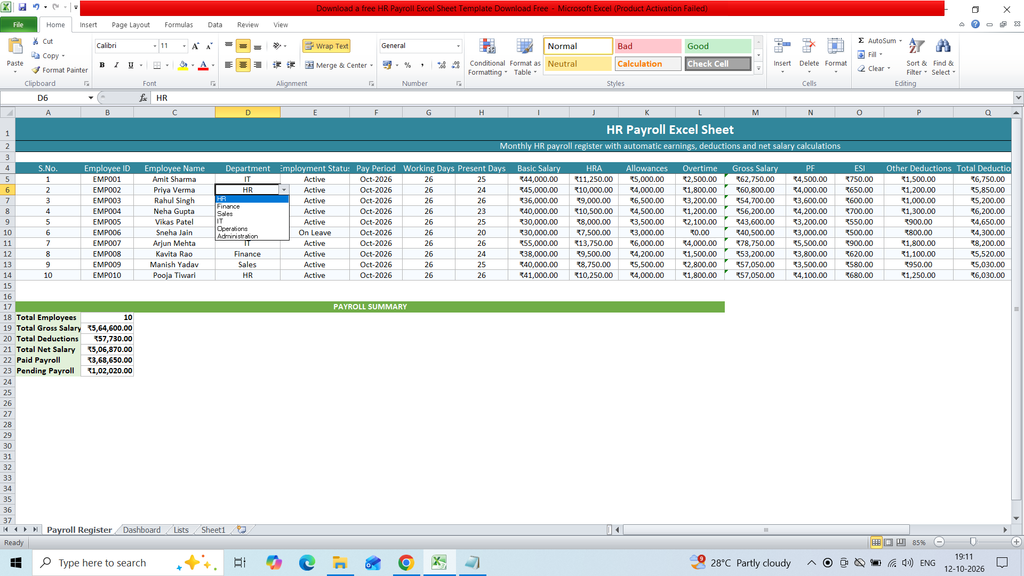
Download a free HR Payroll Excel Sheet Template to easily manage employee salaries and payroll records. This ready-to-use Excel template helps HR professionals and businesses record employee details, employee IDs, basic salaries, allowances, deductions, overtime, bonuses, and net salary calculations in a simple and organized format. It is useful for calculating monthly payroll, tracking salary payments, maintaining employee compensation records, and simplifying payroll management for small businesses, offices, and organizations.
Key Features:
S.No.
Employee ID
Employee Name
Department
Employment Status
Pay Period
Working Days
Present Days
Basic Salary
HRA
Allowances
Overtime
Gross Salary
PF
ESI
Other Deductions
Total Deductions
Net Salary
Pay Mode
Payment Status
Remarks
Formulas :
Gross Salary
=SUM(I5:L5)
Total Deductions
=SUM(N5:P5)
Net Salary
=M5-Q5
HR =SUMIF(‘Payroll Register’!$D$5:$D$14,A6,’Payroll Register’!$R$5:$R$14) =COUNTIF(‘Payroll Register’!$D$5:$D$14,A6)
Finance =SUMIF(‘Payroll Register’!$D$5:$D$14,A7,’Payroll Register’!$R$5:$R$14) =COUNTIF(‘Payroll Register’!$D$5:$D$14,A7)
Sales =SUMIF(‘Payroll Register’!$D$5:$D$14,A8,’Payroll Register’!$R$5:$R$14) =COUNTIF(‘Payroll Register’!$D$5:$D$14,A8)
IT =SUMIF(‘Payroll Register’!$D$5:$D$14,A9,’Payroll Register’!$R$5:$R$14) =COUNTIF(‘Payroll Register’!$D$5:$D$14,A9)
Operations =SUMIF(‘Payroll Register’!$D$5:$D$14,A10,’Payroll Register’!$R$5:$R$14) =COUNTIF(‘Payroll Register’!$D$5:$D$14,A10)
Administration =SUMIF(‘Payroll Register’!$D$5:$D$14,A11,’Payroll Register’!$R$5:$R$14) =COUNTIF(‘Payroll Register’!$D$5:$D$14,A11)
Payment Status Amount
Paid =SUMIF(‘Payroll Register’!$T$5:$T$14,A15,’Payroll Register’!$R$5:$R$14)
Pending =SUMIF(‘Payroll Register’!$T$5:$T$14,A16,’Payroll Register’!$R$5:$R$14)
On Hold =SUMIF(‘Payroll Register’!$T$5:$T$14,A17,’Payroll Register’!$R$5:$R$14)
- File Size 20KB
- Total Sheet 4