Key Features
- Record daily personal expenses
- Automatic serial numbering
- Expense date and month tracking
- Expense category management
- Essential and non-essential expense classification
- Payment method tracking
- Paid and pending status
- Automatic expense calculations
- Total expense summary
- Average expense calculation
- Category-wise expense analysis
- Expense percentage calculation
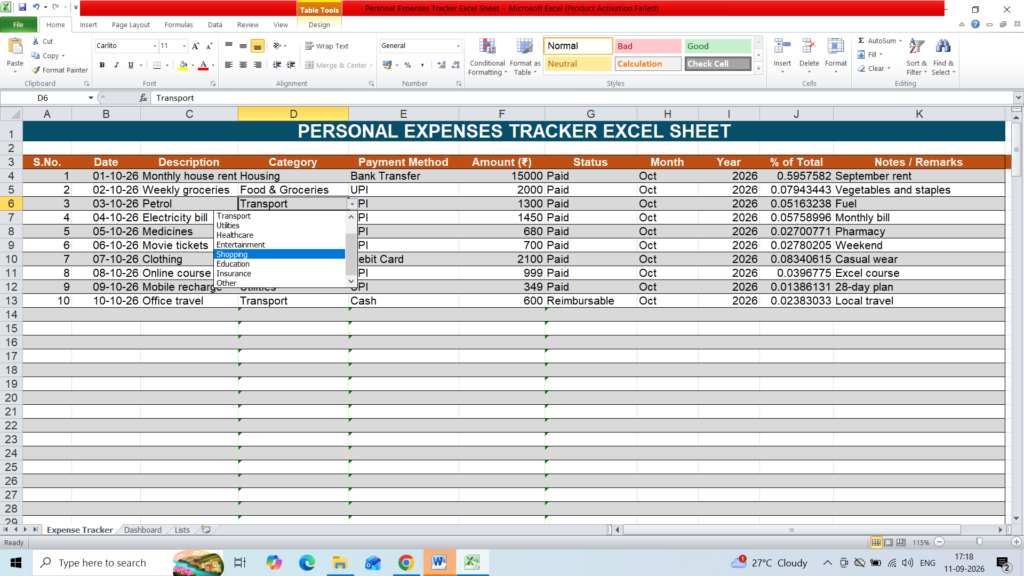
- Dashboard with useful summaries and charts
- Dropdown lists for easy data entry
- Filters for quickly finding expense records
- Professional formatting
- Freeze panes for easier navigation
- Editable in Microsoft Excel
How to Use
- Download the Excel template.
- Open the file in Microsoft Excel.
- Enter your expense details in the Expense Tracker sheet.
- Select categories and other options from the dropdown lists.
The formulas and dashboard will automatically update as you add or modify records
This Personal Expenses Tracker Excel Template is suitable for individuals who want a simple and organized way to manage their everyday spending and understand where their money is being spent.