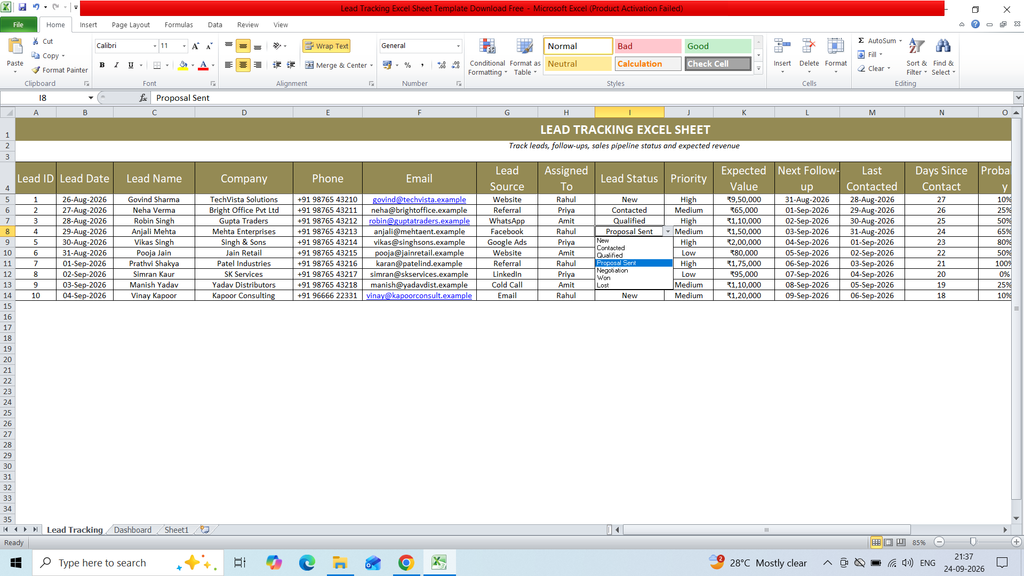
Download a free Lead Tracking Excel Sheet Template to easily record, organize, and monitor sales leads. This ready-to-use Excel template helps businesses track lead names, contact details, lead sources, follow-up dates, sales status, assigned team members, and other important lead information in a simple and structured format. It is useful for managing follow-ups, monitoring lead progress, and keeping sales records organized.
Key Featurs :
- Lead ID
- Lead Date
- Lead Name
- Company
- Phone
- Lead Source
- Assigned To
- Lead Status
- Priority
- Expected Value
- Next Follow-up
- Last Contacted
- Days Since Contact
- Probability
- Weighted Value
- Notes / Remarks
- Data Summery
- Dashboard
Formulas :
Lead ID
=IF(C5=””,””,ROW()-4)
Days Since Contact
=IF(M5=””,””,MAX(0,TODAY()-M5))
Probability
=IF(I5=””,””,IF(I5=”New”,10%,IF(I5=”Contacted”,25%,IF(I5=”Qualified”,50%,IF(I5=”Proposal Sent”,65%,IF(I5=”Negotiation”,80%,IF(I5=”Won”,100%,0%)))))))
Weighted Value
=IF(K5=””,””,K5*O5)
Count
=COUNTIF(‘Lead Tracking’!I5:I1000,A10)
Expected Value
=SUMIF(‘Lead Tracking’!I5:I1000,A10,’Lead Tracking’!K5:K1000)
Weighted Value
=SUMIF(‘Lead Tracking’!I5:I1000,A10,’Lead Tracking’!P5:P1000)
Total Leads
=COUNTA(‘Lead Tracking’!C5:C1000)
Open Leads
=COUNTIFS(‘Lead Tracking’!I5:I1000,”<>Won”,’Lead Tracking’!I5:I1000,”<>Lost”,’Lead Tracking’!C5:C1000,”<>”)
Won Leads
=COUNTIF(‘Lead Tracking’!I5:I1000,”Won”)
Conversion Rate
=IFERROR(E4/A4,0)