Download a free Vendor Payment Excel Sheet Template to easily record, track, and manage payments made to vendors and suppliers. This ready-to-use Excel template helps you organize vendor names, invoice numbers, payment dates, invoice amounts, paid amounts, outstanding balances, payment methods, and payment statuses in a simple and structured format. It is useful for businesses, accountants, and finance teams to monitor vendor payments, track pending dues, maintain accurate financial records, and manage supplier transactions efficiently.
Key Features :
- Sr. No.
- Payment ID
- Invoice No.
- Invoice Date
- Due Date
- Vendor ID
- Vendor Name
- Category
- Department
- Invoice Amount
- GST %
- GST Amount
- Total Payable
- Payment Date
- Amount Paid
- Balance Due
- Payment Status
- Payment Method
- Remarks
Formulas :
Category
=IFERROR(@XLOOKUP(F5,’Vendor Master’!$A$4:$A$13,’Vendor Master’!$G$4:$G$13,””),””)
GST Amount
=J5*K5
Total Payable
=J5+L5
Balance Due
=M5-O5
Payment Status
=IF(P5<=0,”Paid”,IF(TODAY()>E5,”Overdue”,IF(O5>0,”Partially Paid”,”Pending”)))
Total Payable
=SUM(‘Vendor Payments’!M5:M34)
Total Paid
=SUM(‘Vendor Payments’!O5:O34)
Balance Due
=SUM(‘Vendor Payments’!P5:P34)
Bills Overdue
=COUNTIF(‘Vendor Payments’!Q5:Q34,”Overdue”)
Vendor
=’Vendor Master’!B4
Balance Due
=SUMIF(‘Vendor Payments’!G5:G34,D10,’Vendor Payments’!P5:P34)
Count
=COUNTIF(‘Vendor Payments’!Q5:Q34,A10)
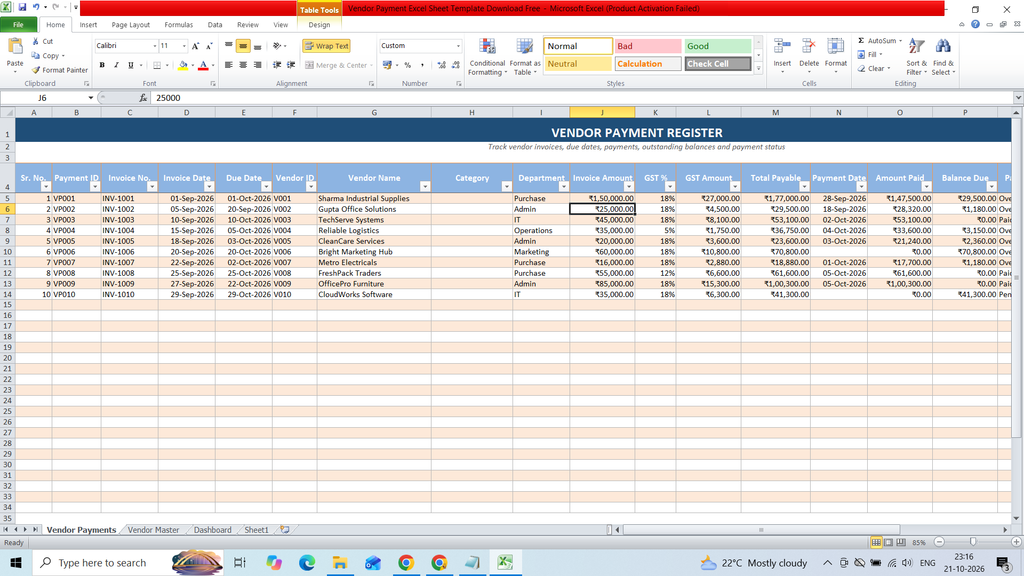
File Size : 30KB
Total Sheet : 4