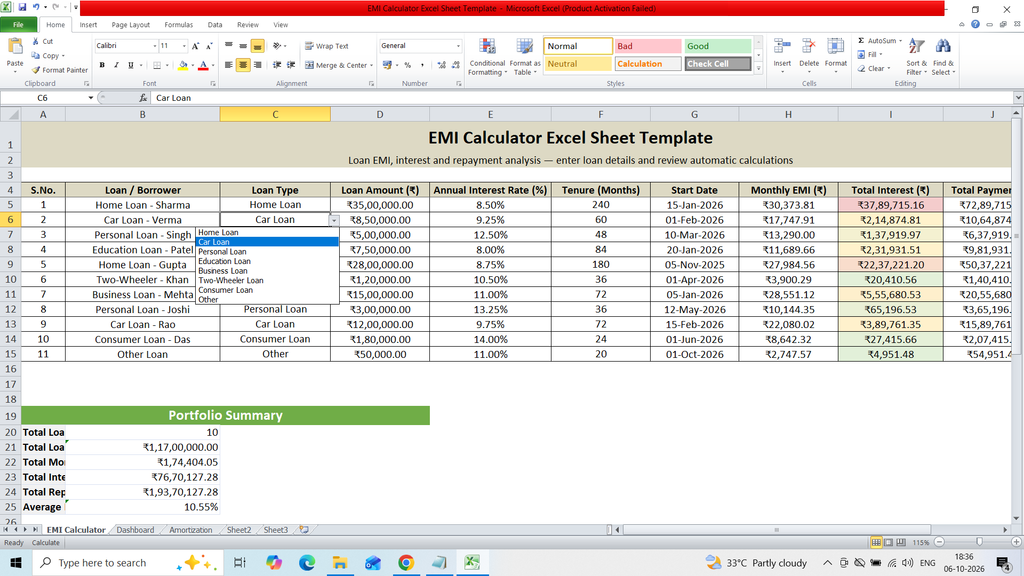
Download a free EMI Calculator Excel Sheet Template to easily calculate and manage monthly loan installments. This ready-to-use Excel template helps you calculate EMI based on loan amount, interest rate, loan tenure, monthly installment, total interest, and total repayment amount. It is useful for comparing loan options, planning monthly budgets, and understanding overall loan repayment costs.
Key Features :
- Loan Amount (₹)
- Annual Interest Rate (%)
- Tenure (Months)
- Start Date
- Monthly EMI (₹)
- Total Interest (₹)
- Total Payment (₹)
- Status
- Dashboard
- Bar Chart
Use Formulas :
Monthly Emi Formula
=IF(OR(D5<=0,F5<=0),””,IF(E5=0,D5/F5,PMT(E5/12,F5,-D5)))
Total Interest Formula
=IF(H5=””,””,H5*F5-D5)
Total Payment Formula
=IF(H5=””,””,H5*F5)